Exhaustive Pattern Matching for Exhausted Flutter Developers
Table of Contents 15 sections
The Flutter ecosystem has produced dozens of state management solutions, yet we’re still manually managing primitive fields at the top of our widget states. Despite our architectural sophistication, we repeatedly return to a combination of loosely defined fields that must be manually kept in sync.
Every Flutter developer knows this dance. You need to load some data, show a spinner while it loads, display the results, or show an error if something goes wrong. Simple, right?
class _MyWidgetState extends State<MyWidget> {
  bool isLoading = true;
  String? error;
  Object? data;

  @override
  void initState() {
    super.initState();

    init();
  }

  Future<void> init() async {
    setState(() {
      isLoading = true;
      error = null;
    });

    try {
      data = await AppRepository.fetchData();
      setState(() {
        isLoading = false;
      });
    } catch (e) {
      setState(() {
        isLoading = false;
        error = e.toString();
      });
    }
  }

  @override
  Widget build(BuildContext context) {
    return Scaffold(
      appBar: AppBar(
        title: Text('My Widget'),
      ),
      body: Center(
        child: isLoading
            ? CircularProgressIndicator()
            : error != null
                ? Text(
                    'Error: $error',
                    style: TextStyle(color: Colors.red),
                  )
                : Text(
                    'Data: $data',
                    style: TextStyle(fontSize: 16),
                  ),
      ),
    );
  }
}
There exists a peculiar rite of passage in Flutter development: the moment you go back to implementing this old loading-error-data pattern, even though you have a robust state management solution in your project. But it’s late Friday, and you’ll be damned if you make another Cubit/State file set or Provider for a simple one-off network fetch.
With that being said, there’s something deeply unsatisfying about this code. We have three fields (isLoading, error, data) that represent what should be mutually exclusive states, yet nothing in our code enforces this exclusivity. We rely on discipline and trust to ensure we never accidentally have isLoading = true and error != null simultaneously, which is roughly equivalent to trusting developers to write bug-free code on their first try.
Like a digital version of Sisyphus, we push the boulder of state management up the hill of the build tree, only to watch it roll back down with each new screen we create.
For simple states, those loose fields are a more-than-okay approach. However, this got me thinking: What if we could use Dart’s type system to make illegal states unrepresentable? How far can we push Dart’s new features to their limits and invent a nice solution?
Crash Course: Sealed Classes & Switch Expressions
Why do Enums Exist?
Enums solve the “magic string/number” problem and give us compile-time safety.
Without enums:
if (status == "loading") // What if you typo "loadding"?
if (status == "eror")   // TYPO
if (status == "success") // Forgot about idle status!
With enums:
enum Status { loading, error, success }

// Type-safe - typos caught at compile time
if (status == Status.loading) // Can't typo this!

switch (status) {
  // Compiler forces you to handle ALL cases
  case Status.loading: ...
  case Status.error: ...
  // Missing Status.success? Compiler error!
}
Enums provide compile-time safety and exhaustive checking. Sealed classes extend this concept by allowing enum-like behavior with data-carrying classes, enabling pattern matching on both type and field values
But we need more.
Dart’s sealed classes let you define a closed hierarchy of types. Think of them as a way to say “these are the only subclasses this base type can ever have.” By marking a class as sealed, you guarantee at compile time that no other code outside your library can extend it, which makes your state machine exhaustively known to the compiler. This is behavior is called exhaustive pattern matching, and it can only be done on something called a closed sum type.
A closed sum type (also called a tagged union or variant type) is a data structure that allows a value to be strictly in one of several different, but fixed, types. Unlike open sum types, closed sum types have a predefined set of possible values; no new cases can be added after the type is defined.
If that sounds familiar, it’s because that’s exactly what Enums universally are across most programming languages!
Each subclass of a sealed class represents one of the distinct cases, and because the base is sealed, the compiler can warn you if you ever forget to handle a particular case; exactly like enums.
sealed class Weather {}

final class Sunny extends Weather {}

final class Rainy extends Weather {
  final int intensity;
  Rainy(this.intensity);
}

final class Cloudy extends Weather {}sealed class Vehicle {}
final class Car extends Vehicle {}
final class Truck implements Vehicle {}
final class Bicycle extends Vehicle {}Why do we need this new kind of enum?
Think of them as enum-flavored classes. If we use a switch statement on a variable of our base type, the compiler will force us to exhaustively specify all the cases (all the different subtypes) for us; just like enums, except they’re classes, which means they can hold information.
Enums are simple and limited in their capabilities. Classes can hold data while enums cannot. All the benefits of a class, all the benefits of an enum.
Why do we need data at all in our classes? What are we trying to accomplish?
There’s a lot of use-cases that we can have. For this specific article, we want 3 distinct sub-classes.
- A
SuccessOperationcan hold a data field that holds what information we loaded. - An
ErrorOperationcan hold the Exception object, theStackTrace, and an optional error message as fields.
Enums cannot do this as they cannot hold data at runtime.
Switch expressions in Dart build on that safety by letting you match against those sealed subtypes in a concise, exhaustively checked expression. Instead of writing a long if/else if chain, we can use a switch on our sealed value, and the compiler enforces that every possible subtype is accounted for, otherwise you’ll get an error.
String describeWeather(Weather weather) {
  return switch (weather) {
    Sunny() => "It's a beautiful sunny day!",
    Rainy(:var intensity) => "It's raining with intensity $intensity",
    Cloudy() => "It's cloudy",
    // No default needed - compiler knows we've covered all cases!
  };
}String getVehicleSound(Vehicle vehicle) {
// ERROR: The switch is missing the Bicycle subtype or a default case.
return switch (vehicle) {
Car() => 'vroom',
Truck() => 'VROOOOMM',
};
}Pattern Destructuring & Branching
ErrorOperation(:var message, data: null) => // do something with messageThat :var message is saying “hey, grab the message field from this ErrorOperation and put it in a variable called message that I can use right away.” The colon (:) is the key - it’s Dart’s way of saying “extract this field.”
Why Is This So Useful?
1. It’s incredibly concise:
// Old way - verbose and repetitive
switch (state) {
  case LoadingOperation():
    if (state.data == null) {
      return const CircularProgressIndicator();
    } else {...}
    break;
  case ErrorOperation():
    final message = state.message;
    if (state.data == null) {
      return Text(message ?? 'Error occurred');
    } else {...}
    break;
}// New way - clean and direct
switch (state) {
LoadingOperation(data: null) => const CircularProgressIndicator(),
ErrorOperation(:var message, data: null) => Text(message ?? 'Error occurred'),
}2. It combines type checking with data extraction: We’re not just asking “is this an ErrorOperation?” We’re asking “is this an ErrorOperation AND, if it is, give me its message field while you’re at it!”
Branching in Action
Weather Example
String getWeatherAdvice(Weather weather) {
  return switch (weather) {
    // Branch 1: Light rain
    Rainy(intensity: <= 3) => "Light drizzle - grab an umbrella!",

    // Branch 2: Heavy rain
    Rainy(intensity: >= 7) => "Heavy downpour - stay inside!",

    // Branch 3: Moderate rain
    Rainy(:var intensity) => "Moderate rain (level $intensity) - raincoat time!",

    // Branch 1: Hot sunny day
    Sunny(temperature: >= 85) => "It's scorching! Stay hydrated!",

    // Branch 2: Pleasant sunny day
    Sunny(:var temperature) => "Beautiful sunny day at ${temperature}°F!",

    Cloudy() => "Overcast skies",
  };
}
Vehicle Example
String getVehicleInfo(Vehicle vehicle) {
  return switch (vehicle) {
    // Branch 1: Electric cars
    Car(fuelType: 'electric') => "Silent and eco-friendly!",

    // Branch 2: Gas cars
    Car(fuelType: 'gasoline') => "Classic combustion engine",

    // Branch 3: Any other car type
    Car(:var fuelType) => "Runs on $fuelType",

    Truck() => "Heavy duty hauling",
    Bicycle() => "Pedal power!",
  };
}
How we can use it for our loading/error/data problem:
switch (state) {
  // Branch 1: ErrorOperation with no data
  ErrorOperation(:var message, data: null) => showErrorDialog(message),

  // Branch 2: ErrorOperation with existing data
  ErrorOperation(:var data?) => showErrorWithData(data),

  // Branch 3: LoadingOperation with no data
  LoadingOperation(data: null) => showSpinner(),

  // Branch 4: LoadingOperation with cached data
  LoadingOperation(:var data?) => showDataWithSpinner(data),
}
Why This Rocks
Instead of having just one case per sealed class, you can have multiple branches per class based on different field conditions. Enums can never do this.
Think of it like a decision tree: “Is it an ErrorOperation? Yes! But does it have data or not?” Each answer leads to a different branch with different handling. No nesting; complete space exhaustion.
This lets you model nuanced states that go beyond simple type matching; you’re matching on both the type AND the specific state that type is in, exhaustively.
Pattern destructuring essentially turns our switch statements into both a type dispatcher AND a data extractor rolled into one elegant expression.
To learn more about these concepts:
Back to our core problem
We have 3 loosely-exclusive fields (data, error, loading) that we want to abstract into something nicer. Let’s put these Dart features together to invent something nice.
A Lightweight Yet Expressive Solution
When managing async calls manually, we often deal with mutually exclusive state indicators. For example, if isLoading is true, then by definition there shouldn’t be valid data (well, sometimes! more on this later) or errorMessage present, and vice versa.
Let’s start with what we’re used to:
isLoading
            ? CircularProgressIndicator()
            : error != null
                ? Text(
                    'Error: $error',
                    style: TextStyle(color: Colors.red),
                  )
                : Text(
                    'Data: $data',
                    style: TextStyle(fontSize: 16),
                  ),
Or, if you’re using BLoC:
  @override
  Widget build(BuildContext context) {
    return BlocProvider(
      create: (_) => MyCubit()..fetchData(),
      child: Scaffold(
        appBar: AppBar(
          title: Text('My Widget with Cubit'),
        ),
        body: Center(
          child: BlocBuilder<MyCubit, MyState>(
            builder: (context, state) {
              if (state is MyLoadingState) {
                return CircularProgressIndicator();
              } else if (state is MyErrorState) {
                return Text(
                  'Error: ${state.message}',
                  style: TextStyle(color: Colors.red),
                );
              } else if (state is MyLoadedState) {
                return Text(
                  'Data: ${state.data}',
                  style: TextStyle(fontSize: 16),
                );
              } else {
                // An probably impossible to reach state.
                return SizedBox.shrink();
              }
            },
          ),
        ),
      ),
    );
  }
On one hand, you can pretend like the code is exhaustively handling all the states because we’re so smart, or, in BLoC’s case, you create a whole state file that also relies on your intuition.
Wait a minute, can’t we improve this BLoC example in a very obvious way?
Of course! We can make the cubit’s state class sealed! That makes those states exclusive to each other.
BLoC was not invented with this feature in mind; rather it relied on a manually created “state” class whenever a cubit or bloc is built. With Dart 3’s sealed classes and switch expressions, BLoC suddenly became significantly more powerful than it was before, because we can now accomplish something very similar to what we are about to do. It’s a perfect puzzle-piece.
  @override
  Widget build(BuildContext context) {
    return BlocProvider(
      create: (_) => MyCubit()..fetchData(),
      child: Scaffold(
        appBar: AppBar(title: Text('My Widget with Cubit')),
        body: Center(
          child: BlocBuilder<MyCubit, MyState>(
            builder: (context, state) {
              // A switch expression on a sealed state class!
              return switch (state) {
                MyLoadingState() => CircularProgressIndicator(),
                MyErrorState(:message) => Text(
                  'Error: $message',
                  style: TextStyle(color: Colors.red),
                ),
                MyLoadedState(:data) => Text(
                  'Data: $data',
                  style: TextStyle(fontSize: 16),
                ),
              };
            },
          ),
        ),
      ),
    );
  }
Something about this guaranteed switch expression just scratches an itch in my brain, but BLoC isn’t the end-all-be-all. I don’t use BLoC in most of my projects. I want the benefits of these exhaustively pattern-matched states without pulling in the entire framework.
Additionally, this common State pattern does not handle any advanced behavior I usually want, like easy retrying, loading in the background, toast errors instead of full screen errors, etc… We can definitely support that behavior with BLoC, but it’s a manual, boilerplatey approach every single time any of these features are needed, for every state class that needs to be made.
The result: a utility class that helps alleviate some pain in a BLoC-flavored way. It is not intended to replace any state management solution; but rather just co-exists in the same space gracefully.
The Smallest Example Possible
Imagine we want to load a list of posts from the network and display it, showing a loading spinner while fetching and a retry option on errors. Without the mixin, you might manage this with a bunch of setState calls and field flags. But with AsyncStateMixin, it can look more elegant:
class _PostsPageState extends State<PostsPage>
    with AsyncStateMixin<List<Post>, PostsPage> {
  @override
  bool get globalRefresh => true;

  @override
  Future<List<Post>> fetch() async {
    final response = await http.get(
      Uri.parse('https://jsonplaceholder.typicode.com/posts'),
    );
    if (response.statusCode != 200) {
      throw Exception('Failed to load posts: ${response.statusCode}');
    }
    return json.decode(response.body).map(Post.fromJson).toList();
  }

  @override
  Widget build(BuildContext context) {
    return Scaffold(
      appBar: AppBar(title: const Text('Posts')),
      body: switch (state) {
        LoadingOperation(data: null) => const Center(
          child: CircularProgressIndicator(),
        ),
        ErrorOperation(:var message, data: null) => Center(
          child: Column(
            mainAxisSize: MainAxisSize.min,
            children: [
              Text(message ?? 'An error occurred'),
              ElevatedButton(onPressed: reload, child: const Text('Retry')),
            ],
          ),
        ),
        LoadingOperation(:var data?) ||
        ErrorOperation(:var data?) ||
        SuccessOperation(:var data) => ListView.builder(
          itemCount: data.length,
          itemBuilder: (context, index) {
            final post = data[index];
            return ListTile(
              title: Text(post.title),
              subtitle: Text(
                post.body,
                maxLines: 2,
                overflow: TextOverflow.ellipsis,
              ),
              trailing: Text('#${post.id}'),
            );
          },
        ),
      },
    );
  }
}
As soon as the widget is inserted into the tree, the mixin’s initState lifecycle hook kicks off the fetch() function, immediately setting its internal state to a LoadingOperation (initially with data == null). Inside fetch(), we perform an HTTP GET on the JSONPlaceholder API, decode the JSON into Post objects, and let the mixin wrap the result in a SuccessOperation internally. If the network call fails, the mixin instead captures the error in an ErrorOperation. By overriding globalRefresh = true, we indicate that the entire build function must rebuild on state transitions. We will discuss the specifics of this in the “Listening to Changes” section.
The juicy part: In the build() function, we are able to switch on the mixin’s state to decide what to render. If it’s LoadingOperation(data: null), meaning there is no cached data, we show a centered CircularProgressIndicator; if it’s ErrorOperation(message: …, data: null) (error with no cached data), we display a friendly Text widget with that error; and in any case where data is present, whether from a successful load, a previous error stash, or mid-refresh, we spin up a ListView.builder that turns each Post into a ListTile.
Every time the mixin updates its state; calling setState under the hood; the widget rebuilds automatically, so you only declare “what to show” for each state without ever juggling manual loading flags or try/catch blocks in your UI code.
With switch expressions, you can assert a combination of complex branches, all while still being exhaustive. If a single branch is not accounted for, the compiler throws. Here’s an example scenario:
  return switch (state) {
    LoadingOperation(data: null) =>
      const CircularProgressIndicator(),
    LoadingOperation(:var data?) =>
      Column(children: [
        Text(data), // Show stale data
        const LinearProgressIndicator(), // Show loading
      ]),
    SuccessOperation(:var data) =>
      Text(data), // Data is guaranteed non-null here!
    ErrorOperation(:var message, data: null) =>
      ErrorWidget(message: message),
    ErrorOperation(:var message, :var data?) =>
      Column(children: [
        Text(data), // Show stale data
        ErrorBanner(message: message), // Show error
      ]),
  };
This pattern matching syntax is powerful! Notice how:
- We can destructure properties inline with :var data
- We can check for null values in patterns.
- The compiler ensures we handle every possible combination.
- Each branch knows exactly what type of state it’s dealing with, no dangling branches allowed.
Disclaimer
Before we dive into how this works, let’s be explicit about its mission.
This mixin is not aiming to be your next global state management solution, nor is it here to replace established powerhouses like BLoC or Riverpod for complex application-wide state. Instead, AsyncStateMixin is a pragmatic, lightweight utility designed for a very specific and common scenario: managing the lifecycle of asynchronous operations that are tightly scoped to a single widget or a localized UI component.
It shines in a very specific niche: ephemeral UI components that need exactly one async operation.
Think of those everyday situations:
- A dialog needing to fetch and display some immediate and static network data to a user.
- A settings page, like a Billing Page.
- A simple changelogs or announcements page that fetches content on open, perhaps with a pull-to-refresh.
- A paywall bottom sheet that needs to load available subscription plans from your database.
- A confirmation dialog that performs a single async action and needs to reflect loading/success/error for that specific interaction.
These are all very real practical examples from my projects. These components are short-lived, self-contained, and creating a Cubit or Provider setup would be, perhaps not overkill, but rather annoying.
It’s about targeted convenience where desired and reducing developer friction for these common, focused tasks. Developer discipline is required.
This article is aims to educate on the concepts we’re walking through first, and offer a real utility second.
Now that we’ve got that out of the way, let’s take a peek under the hood at how those states are structured. The API is built upon a surprisingly simple foundation of Dart’s sealed classes.
The Operation State Model
AsyncStateMixin is built around the concept of distinct states for an asynchronous operation; a finite state machine. It defines three conceptual states for any async workflow: loading, success, and error.
Under the hood, it defines an OperationState<T> sealed class, where T is your expected data model. We then have these sub types:
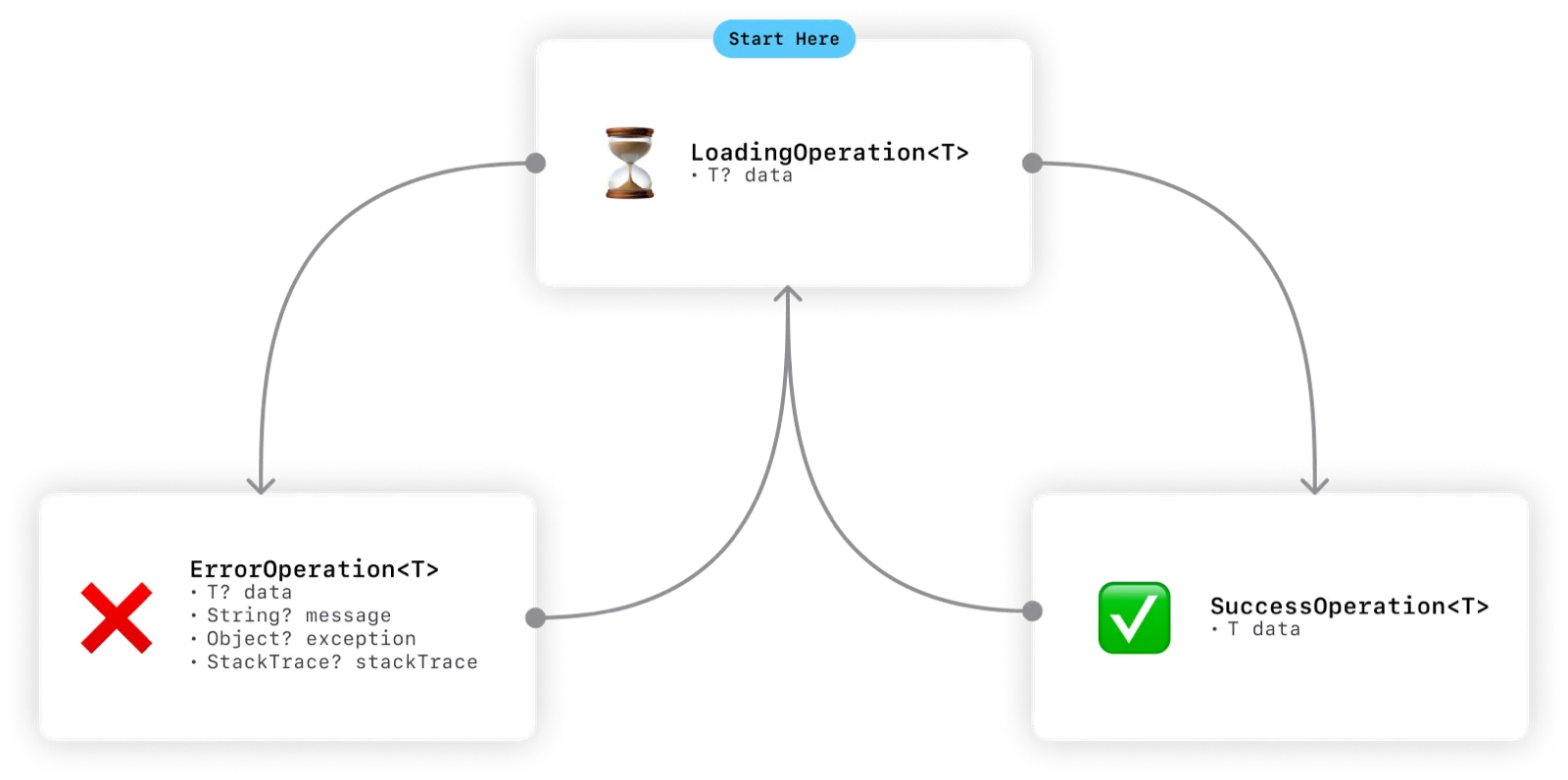 Figure: Diagram representing the OperationState<T> class hierarchy and state transitions.
LoadingOperation: Representing an ongoing operation (e.g., network call in progress). This state can carry along the last known data (of type T) if available. This lets your UI optimistically display stale data while indicating progress. For example, if you implement a pull-down-to-refresh mechanic, the old data (of type T?) must stay while the new technical state is “loading”. Essentially any background refreshes that shouldn’t visually disrupt your UI would utilize that field.SuccessOperation: Representing a completed operation with your resulting data that is guaranteed to be non-null. It holds a non-nullable value of your type T.ErrorOperation: Representing a failed operation, holding error details. It can include an optional error message, the exception object, a stack trace for debugging, and even the last known data just like theLoadingOperation. For example, a failed background refresh that should just show a temporary toast notification instead of replacing your whole UI (which is annoying and disruptive).
From these 3 distinct operations, we can derive 2 additional states on top of the 3 because of the nullable carried-over data field, as well as some others.
Conceptually, the initial state is the state before any operation starts. In AsyncStateMixin’s implementation, the initial state is just a LoadingOperation with no data (hasData == false, data == null), especially if the mixin is set to load immediately (default behavior). But if needed, you can consider the very first state as “initial”; the widget hasn’t begun loading yet.
If you haven’t figured it out yet: This is very syntactically similar to how you would design a State file for a Cubit/BLoC. The difference is that this is a pragmatic, generalized version. Instead of a sister-State file for each Cubit/BLoC, this is one Operation to Rule Them All, no extra files needed.
Call it Cubit-light, if you must.
The One-Operation Rule
AsyncStateMixin has a deliberate limitation: it manages exactly one async operation per widget. This isn’t a design flaw; it’s the feature. If your screen needs multiple independent async calls, coordinated state, or complex data relationships, you’ve outgrown this pattern and should reach for proper state management.
But for the surprisingly common case of “load this one thing when the screen opens, maybe refresh it, handle errors gracefully,” AsyncStateMixin eliminates a lot of tedious, repetitive code that a lot of Flutter developers have written.
Listening to Changes
There are multiple ways to observe operation state changes. To manage and propagate these states, AsyncStateMixin uses a ValueNotifier internally. The mixin provides a stateNotifier (ValueNotifier<OperationState<T>>) field that holds the current state and notifies listeners whenever the state changes.
Method 1 (recommended & most performant): Because stateNotifier is a Flutter ValueNotifier, we can listen to it or use Flutter’s built-in ValueListenableBuilder widget to rebuild UI in specific parts of the build tree whenever the state updates instead of rebuilding everything inefficiently. This allows us to conveniently rebuild only the relevant parts of the UI that actually change. It also has the advantage of automatically managing the listener lifecycle; we won’t need to attach the listener nor dispose it.
@override
Widget build(BuildContext context) {
  return Scaffold(
    appBar: AppBar(title: const Text('Posts')),
    body: ValueListenableBuilder<OperationState<List<Post>>>(
      valueListenable: stateNotifier,
      builder:
          (context, state, _) => switch (state) {
            LoadingOperation(data: null) => const Center(
              child: CircularProgressIndicator(),
            ),
            ErrorOperation(:var message, data: null) => Center(
              child: Column(
                mainAxisSize: MainAxisSize.min,
                children: [
                  Text(message ?? 'An error occurred'),
                  ElevatedButton(
                    onPressed: reload,
                    child: const Text('Retry'),
                  ),
                ],
              ),
            ),
            LoadingOperation(:var data?) ||
            ErrorOperation(:var data?) ||
            SuccessOperation(:var data) => ListView.builder(
              itemCount: data.length,
              itemBuilder: (context, index) {
                final post = data[index];
                return ListTile(
                  title: Text(post.title),
                  subtitle: Text(
                    post.body,
                    maxLines: 2,
                    overflow: TextOverflow.ellipsis,
                  ),
                  trailing: Text('#${post.id}'),
                );
              },
            ),
          },
    ),
  );
}
Method 2: We can use stateNotifier.addListener(fn) to manually add a listener function. It’s best practice to also trigger removeListener on dispose().
Method 3 (use with caution): If the build function is simple enough that both methods feel like premature optimization, or if the build function keeps wrapping parts of itself with ValueListenableBuilder boilerplate multiple times, we can override the globalRefresh getter to true like our original example. This approach uses a “life’s too short” philosophy. Let the entire widget rebuild and save those precious brain cycles for more interesting problems than state propagation mechanics.
These listening methods give us flexible ways to respond to state changes, and we’re using established Flutter concepts instead of learning a new syntax (looking at you, MobX!), but they don’t explain how those states evolve in the first place. Let’s examine the lifecycle of a state transition from initiation to completion.
How Do States Transition?
When using AsyncStateMixin, your widget’s state calls load() to kick off an async operation (usually on initState). The mixin will then automatically:
- Set the
stateNotifierto aLoadingOperation(optionally carrying forward any previous data). - Execute the asynchronous
fetch()function (which you must override). - If
fetch()returns successfully, update the state to aSuccessOperationwith the result. - If
fetch()throws an exception, catch it and update the state to anErrorOperation, capturing the error details.
  FutureOr<void> load({bool cached = true}) async {
    final lastData = cached ? stateNotifier.value.data : null;
    stateNotifier.value = LoadingOperation<T>(data: lastData);

    try {
      final result = await fetch();
      if (!mounted) return;

      stateNotifier.value = SuccessOperation<T>(data: result);
    } catch (exception, stackTrace) {
      onError(exception, stackTrace);
      if (!mounted) return;
      stateNotifier.value = ErrorOperation<T>(
        message: errorMessage(exception, stackTrace),
        exception: exception,
        stackTrace: stackTrace,
        data: lastData,
      );
    } finally {
      if (globalRefresh && mounted) setState(() {});
    }
  }
All of this happens behind the scenes, so you don’t have to manually toggle anything; you simply provide the fetch() function with data, it does all the state wrangling for you.
With this state machine in place, we’ve effectively transformed our async operations from a quantum superposition of maybe-loading-maybe-error states to discrete, deterministic transitions ala-BLoC.
Lessons Learned: Where Theory Meets Practice
Building this taught us several valuable lessons about state management and software design:
Lesson 1: Type Safety Has Limits
While sealed classes give us compile-time guarantees about state exhaustiveness, they can’t help with the temporal aspects of state management. We still need to manage when transitions happen, and the compiler can’t verify that our state transitions follow a valid sequence. For example, who’s to stop us from allowing a refresh/retry button from being tapped on 100x a second? Not this utility. To get around that, more advanced control over the flow is needed.
Lesson 2: The Single Responsibility Challenge
As I used this pattern, I quickly hit a wall: real widgets rarely have just one async operation. The moment you need two independent data sources, this pattern breaks down. This is why solutions like Riverpod, BLoC, MobX don’t automatically wrap your sequences for you like this and prefer to delegate that task for the developer to manually juggle.
Lesson 3: Coupling and Testability
One huge flaw of what we’ve created: we’ve made separation of concerns impossible. Business Logic is now directly tied to UI which is an anti-pattern.
By embedding the fetch() method directly in the widget state, we’ve created a testing nightmare. How do you test the widget without triggering real network calls? How do you test the business logic separately from the UI?
AsyncStateMixin deliberately couples state management with the widget for simplicity in trivial cases. We trade testability and separation of concerns for reduced boilerplate. This is acceptable only when:
- The widget is genuinely trivial.
- You’re prototyping.
- The cost of proper architecture exceeds the benefit.
Developer discipline is needed here.
Next, let’s compare our elegant little solution against the heavyweight champions of the state management world.
Comparison To Other Solutions
By implementing our own state-management approach and breaking down its limitations, we’ve observed why other solutions are designed the way that they are. Let’s discuss how other state management solutions compare to our little utility.
Vs. FutureBuilder
A staple built-in feature in the Flutter framework, which has it’s annoying limitations:
FutureBuilder<User>(
  future: myFuture,
  builder: (context, snapshot) {
    if (snapshot.hasData) return Text(snapshot.data!.name);
    if (snapshot.hasError) return Text('Error: ${snapshot.error}');
    return CircularProgressIndicator();
  },
)- The future you provide must be elevated as a field so that your build function doesn’t re-trigger it each time. This is annoying.
- Implementing retry is annoying. If only part of your subtree uses this
FutureBuilder, asetStateto refresh the future field is inefficient, and optimizing it just becomes more annoying. - I checked if
hasData, but my snapshot.data thinks its still null. Annoying. - It’s not exhaustive. This does not spark joy. It doesn’t make my brain itch. Annoying.
These limitations exists because FutureBuilder is purely declarative. It reacts to a Future, it doesn’t manage it.
Vs. BLoC
A common complaint about BLoC’s boilerplate is this: “Why do I need three files for a simple fetch?” Even with Cubits, we often want one extra file for state. But implementing AsyncStateMixin helps us understand exactly why this annoying bulky separation exists:
// What seems like "boilerplate" is actually separation of concerns
class UserCubit extends Cubit<UserState> {
  UserCubit(this._repository) : super(UserLoading());

  final UserRepository _repository;

  Future<void> loadUser() async {
    emit(UserLoading());
    try {
      final user = await _repository.getUser();
      emit(UserSuccess(user));
    } catch (e) {
      emit(UserError(e.toString()));
    }
  }
}
Here’s what we learned:
- Testability: We can test state transitions without any UI.
- Reusability: Multiple widgets can listen to the same Cubit.
- Debugging: We can log every state transition in one place without build-function interference.
When we try to test widgets using AsyncStateMixin, we can immediately understand why BLoC separates these concerns. The question “How do I mock the fetch() method?” leads us down a rabbit hole that ends with “Oh, that’s why Cubits exist.”
The state is effectively different from the UI. The state signals to the UI the story that needs to be told, the UI decides how to tell the story with its animations, colors, designs. This is what effective separation of concerns looks like, and this is what AsyncStateMixin is NOT doing.
Vs. Riverpod’s AsyncValue
Riverpod’s AsyncValue might feel very familiar:
final userProvider = FutureProvider<User>((ref) async {
  return await ref.watch(repositoryProvider).getUser();
});

// In the widget
Widget build(BuildContext context, WidgetRef ref) {
  final asyncUser = ref.watch(userProvider);

  return asyncUser.when(
    data: (user) => Text(user.name),
    loading: () => CircularProgressIndicator(),
    error: (err, stack) => Text('Error: $err'),
  );
}
A symptom of a time without sealed-types, yet still reveals a gorgeous API.
The problem with this system is that it’s too rigid and constrained. It’s beautifully concise and pragmatic, but it doesn’t give you conditional branches. You can’t render stale data while loading in the background. You can’t show a toast notification if an error happens after a refresh while old data is rendered.
Despite being excellent at what it is, AsyncStateMixin might offer a more flexible approach. Again, this is at the cost of testability and coupling.
An intuitive observation: we can take what we learned and enhance Riverpod’s FutureProvider with switch expressions and sealed types. Then you might end up with something in the same vein! Perhaps an article for a different time.
Vs. ValueResponse/AsyncSnapshot (or similar)
// This is pseudocode of a common pattern I've seen multiple times.

enum ValueResponseStatus { empty, success, error }

class ValueResponse<T> {
  final T? data;
  final String? error;
  final ValueResponseStatus status;

  bool get isEmpty => status == ValueResponseStatus.empty;
  bool get isSuccess => status == ValueResponseStatus.success;
  bool get isError => status == ValueResponseStatus.error;

  ValueResponse.empty() : status = ValueResponseStatus.empty, ...;
  ValueResponse.success(T data) : status = ValueResponseStatus.success, ...;
  ValueResponse.error(String message) : status = ValueResponseStatus.error, ...;
}class _PostsPageState extends State<PostsPage> {
ValueResponse<List<Post>> response = ValueResponse.empty();
@override
void initState() {
super.initState();
loadPosts();
}
Future<void> loadPosts() async {
final result = await fetchPosts();
setState(() => response = result);
}
@override
Widget build(BuildContext context) {
if (response.isSuccess) {
return ListView(children: response!.data.map(buildPost).toList());
} else if (response.isError) {
return Column(children: [
Text('Error: ${response!.error}'),
ElevatedButton(onPressed: loadPosts, child: Text('Retry')),
]);
} else {
return CircularProgressIndicator();
}
}
}This a common approach many developers write that provides type-safe result handling. In fact, it’s nearly identical to AsyncSnapshot from FutureBuilder. It’s conceptually similar, but with more type-safety and doesn’t depend on the Flutter SDK.
The problem with it is that it doesn’t solve the problems we solved.
While it is type-safe to prevent illegal states, it’s not exhaustive, and result-type wrappers are just data containers. AsyncStateMixin is a complete state manager that handles the update coordination, lifecycle management, and state transitions automatically. With AsyncStateMixin, you write fetch() once and nothing else. The mixin orchestrates all the state changes for you. The OperationState class is the data-container, split into multiple sub-classes for clarity and offers exhaustive pattern matching, but it is not the whole solution.
Result-type wrappers are excellent for returning clean success/error results from functions, but they don’t eliminate the manual state management dance in our UI layer, and may end up masking exceptions. We’re forced back to the original problem, except, now, it’s masked under an object that needs to be checked for an error instead of having it gracefully throw and get caught automatically in our view.
Vs. The Manual Approach
Revisiting the manual boolean approach with fresh eyes:
bool isLoading = true;
String? error;
User? data;
We now understand why this pattern persists:
- It’s immediately understandable: no abstractions to learn.
- It’s debuggable: we can inspect each field directly.
- It’s flexible: we can definitely have intermediate states like “
loadingButShowingStaleData”.
The problem isn’t that this approach is “wrong”, it’s that it scales poorly. The first time? Fine. The fifth time? We’re starting to see patterns and duplicating code. The fiftieth time? We need something more relaxing.
The Real Lessons: What This Journey Taught Us
Lesson 1: Abstraction Has a Cost
Every abstraction, including AsyncStateMixin, trades simplicity for capability. FutureBuilder is simple but limited. BLoC is capable but complex. The “best” solution depends entirely on your personal choice of constraints.
Lesson 2: Type Safety Is Just One Tool
Sealed classes and exhaustive pattern matching are powerful, but they’re not a silver bullet. They help with “what states are possible” but not with “when should transitions happen” or “how do we test this” or “what happens when requirements change.” One major downside is that we actually cannot extend a sealed class from outside its own library. It’s not allowed. Extensibility is a trade-off with this solution. If you decided to one day add an IdleState or SomeOtherLoadingState, it’s an immediate brick wall without duplicating the code with modifications.
Lesson 3: The Value of Constraints
Riverpod’s AsyncValue shows us that constraints can be features. By making certain patterns impossible, you guide developers toward better solutions. AsyncStateMixin takes that a step further by allowing very strict constraints, but under better conditional branching for more advanced cases. It’s forcing us to make decisions to improve UX.
The mixin encourages a mindset of handling the full async lifecycle. By providing both load() and reload(), it nudges you to consider not just the first load but subsequent refreshes. By capturing the last data and reusing it during reloads, it nudges toward a better user experience. No sudden blank screen when pulling to refresh, for instance. These are subtle design touches that come from real-world experience dealing with async UX: users appreciate when an app doesn’t flicker or lose context on a reload, and developers appreciate not having to implement that caching behavior every single time from scratch. I created this because I had to repeat this behavior on multiple occasions.
Nuance on Coexistence with Other State Management Solutions
It’s important to reiterate that AsyncStateMixin is designed to be a good citizen. If your team is already heavily invested in and proficient with a comprehensive state management solution, and you have established patterns for handling all operations (even simple ones), then introducing another utility might add unnecessary cognitive load. Consistency is valuable.
However, AsyncStateMixin can harmoniously coexist. For example, in Hyper Zones, we primarily use MobX for application-wide state, but for isolated screens like displaying changelogs (a single fetch, maybe a refresh), AsyncStateMixin is a perfect fit; no need for a new MobX store for such a localized, simple task.
The decision to use it alongside other solutions should be driven by a genuine simplification for clearly defined, isolated use cases, rather than creating a fragmented approach without clear team guidelines.
I don’t need to have a test suite that analyzes whether the state of my Firestore changelogs collection query succeeds well or not. That’s just utterly asinine.
When NOT to Use AsyncStateMixin
Reiterating this again: AsyncStateMixin is really only solving a common niche. It is not and will never be a replacement for any state management solution. It’s a simple utility that takes some pain away from common patterns.
1. Screens with Multiple Operations
When multiple async operations need to coordinate or depend on each other’s results in complex ways, AsyncStateMixin’s localized approach becomes limiting. For example, if your widget is relying on two pieces of data, you’re only provided access to one via stateNotifier.
If your UI contains dozens of independent asynchronous operations (like a social media feed with numerous interaction points), AsyncStateMixin will hold you back as it only controls a singular future.
However, you can absolutely load multiple pieces of data and store them as an external fields manually, you’ll still get the remaining benefits of this mixin.
2. Application-Wide State
AsyncStateMixin is fundamentally tied to the widget lifecycle. For state that needs to persist beyond widget boundaries or be accessed from multiple disconnected parts of your application, it’s not suitable.
3. Advanced Cancellation Requirements
AsyncStateMixin doesn’t provide sophisticated mechanisms for cancelation mid-flight out of the box.
Solutions like CancelableOperation, Dio, and streams with takeUntil offer more explicit cancellation control.
4. Teams Heavily Invested in Another Solution
If your team has already standardized on another state management approach and built infrastructure around it (custom lint rules, code generation, testing utilities), introducing AsyncStateMixin might create unnecessary inconsistency.
Stick with your existing solution for consistency unless the benefits significantly outweigh the cognitive overhead of mixing approaches.
Understanding these limitations doesn’t diminish AsyncStateMixin’s value, it simply helps position it correctly in your toolkit. At the end of the day, it’s a state management utility, not a state management solution.
Conclusion
In the Flutter ecosystem, we’re fortunate to have many tools for state management, but it’s important to pick the right tool for the job. AsyncStateMixin fills a very common niche that many Flutter devs hit often: you have some simple asynchronous work (loading data, calling an API, reading local storage) and you want to manage the loading/error/success states with minimal fuss and maximum clarity. By leveraging mixins, sealed classes, and ValueNotifiers, this pattern keeps your code clean, simple, clear, and performant. There’s no need for external packages or elaborate architecture when all you need is to handle a simple async result on your State class.
Rather than architectural malpractice, this approach represents harm reduction in software design. The reality is that developers will take shortcuts when faced with simple async operations. The choice isn’t between this solution and perfect architecture, but between this solution and scattered setState calls with loose boolean fields. By providing a structured shortcut that enforces type safety and proper state transitions, this pattern makes inevitable shortcuts better while educating developers about state management concepts. It serves as a valuable stepping stone that improves common practices while preparing developers to recognize when they’ve outgrown the pattern and need to graduate to full state management solutions.
When you try to add a second async operation, you’d normally make a second set of flags for it and track those in your build function, which accumulates technical debt further. AsyncStateMixin will immediately deter you from doing that. That’s your signal that a proper state management solution must be used and refactor the widget that way instead.
In summary, AsyncStateMixin is not here to replace robust solutions. If you have those packages or similar in your codebase, it’s ideal to maintain consistency by making use of them. What AsyncStateMixin is is a cleaner and safer way of implementing the lazy solution: a loading boolean, a nullable error string, and a nullable data field.
The Code
A foundational principle behind AsyncStateMixin is to be as unobtrusive as possible. The core mixin code you see is self-contained. You can copy and paste this directly into your project to start benefiting from structured async state handling without adding any external package dependencies.
Alternatively, you can depend on this new package I just published directly, which maintains this code and iterates on it with better functionality:
flutter_operations | Flutter packageType-safe async operation state management for Flutter using sealed classes and exhaustive pattern matching.pub.dev