Building the Plugin Runtime Dart Is Missing
Table of Contents 6 sections
Last year I was building an AI agent platform at Codelessly with around thirty different features: Auto-model routing, context injection, auto-retry with fallback agents, api key/BYOK secrets resolution, MCP server integrations, custom system prompts, live-tunable temperature and tools, per-session sandboxing, and so on. The list kept growing.
Every one of these features had to be enable-able, override-able, settings-tunable, and hot-swappable at runtime. A user toggling the testing-agent off in their settings UI had to actually unwire it from the bus, free its resources, and let any higher-priority replacement take over without a restart. Automatic context injection had to be toggleable per user. We had to prototype four different system prompts against four different scenarios without ever touching the original.
No state management solution really prepares you for this. None of them got me the dynamicity and configurability I needed. Flutter has amazing state managers and DI containers, but I didn’t need DI, and I didn’t need state management. I needed a runtime, with all the lifecycle, isolation, and reconciliation that implies.
What I needed was a system that effectively behaves like your IDE’s plugin and extension system, but in Dart.
So I wrote one. It’s now plugin_kit, the backbone of Codelessly’s agent platform under the hood. Let’s take a tour.
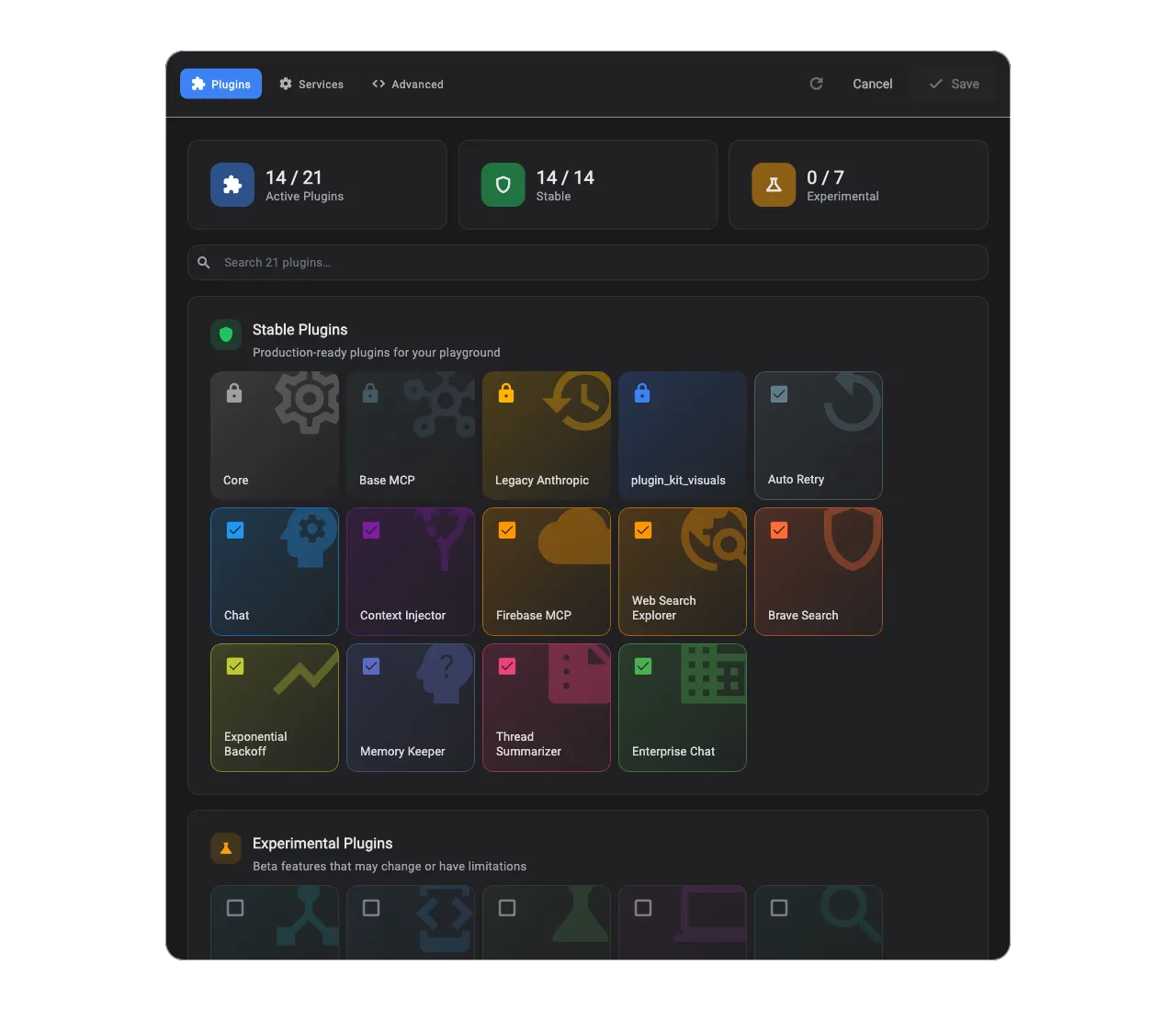 Plugin Kit Dialog showing the Plugins tab with toggleable enable/disable controls for each registered plugin
What is a plugin runtime?
A Dependency Injection (DI) container answers the question:
“give me an instance of X, I don’t care what or how it is implemented.”
A plugin runtime answers a different question:
“given this set of services, this user’s settings, and this session’s scope, compose a coherent system, and let me change my mind at any time. I want to do action X, I don’t care what comes back.”
The difference is composition. DI gives you a way to wire up a fixed graph at startup. A plugin runtime gives you a way to wire up a dynamic graph. One that responds to settings changes, plugin enable and disable, priority overrides, and session boundaries, all while the application is running.
When a singleton stops being enough
Most apps don’t need a plugin runtime.
If your app has one HTTP client, one auth service, one analytics service, and a few screens that call them, use the boring thing. Instantiate the client. Register the service. Ship the app. Nobody gets a trophy for turning a note taking app into a miniature operating system.
Plugin Kit starts making sense at the exact moment the word “just” starts lying to you.
- “Just add a setting to disable this provider.”
- “Just let enterprise customers override this behavior.”
- “Just let the admin dashboard turn this feature off without redeploying.”
- “Just create a quick prototype with this implementation.” (oh my god)
- “Just make sure the original runs if this way fails.”
At first, each of those sounds like a small request. One flag. One if statement. One extra service. But after a while, your app stops being a clean tree of dependencies and becomes a negotiation between features, settings, tenants, sessions, fallbacks, priorities, and runtime decisions.
That is the point where a singleton is no longer the architecture. It is just the place where the architecture is hiding.
Take an AI chat product. You start with one model provider. Then you add a second one. Then you add model-routing. Then your team wants to test a new system prompt for the next release. A client needs their traffic pinned to a specific provider. Your ops dashboard needs to globally disable a provider because it’s costing too much. One session needs experimental tools enabled while another must stay locked down. A support engineer needs debug tooling on one customer’s session to investigate a broken chat. The new release should have old projects using the old system.
None of that is “dependency injection” anymore. The hard part is not “getting an instance.”
The hard part is deciding which behavior is allowed to exist, for this user, in this session, under these settings, right now.
That is the seam Plugin Kit is designed for.
It gives you a place to say: these services exist, these ones are enabled, these ones win when there is a conflict, these ones are scoped to a session, and these ones should disappear cleanly when the session ends.
So no, you probably should not use Plugin Kit for a simple CRUD app.
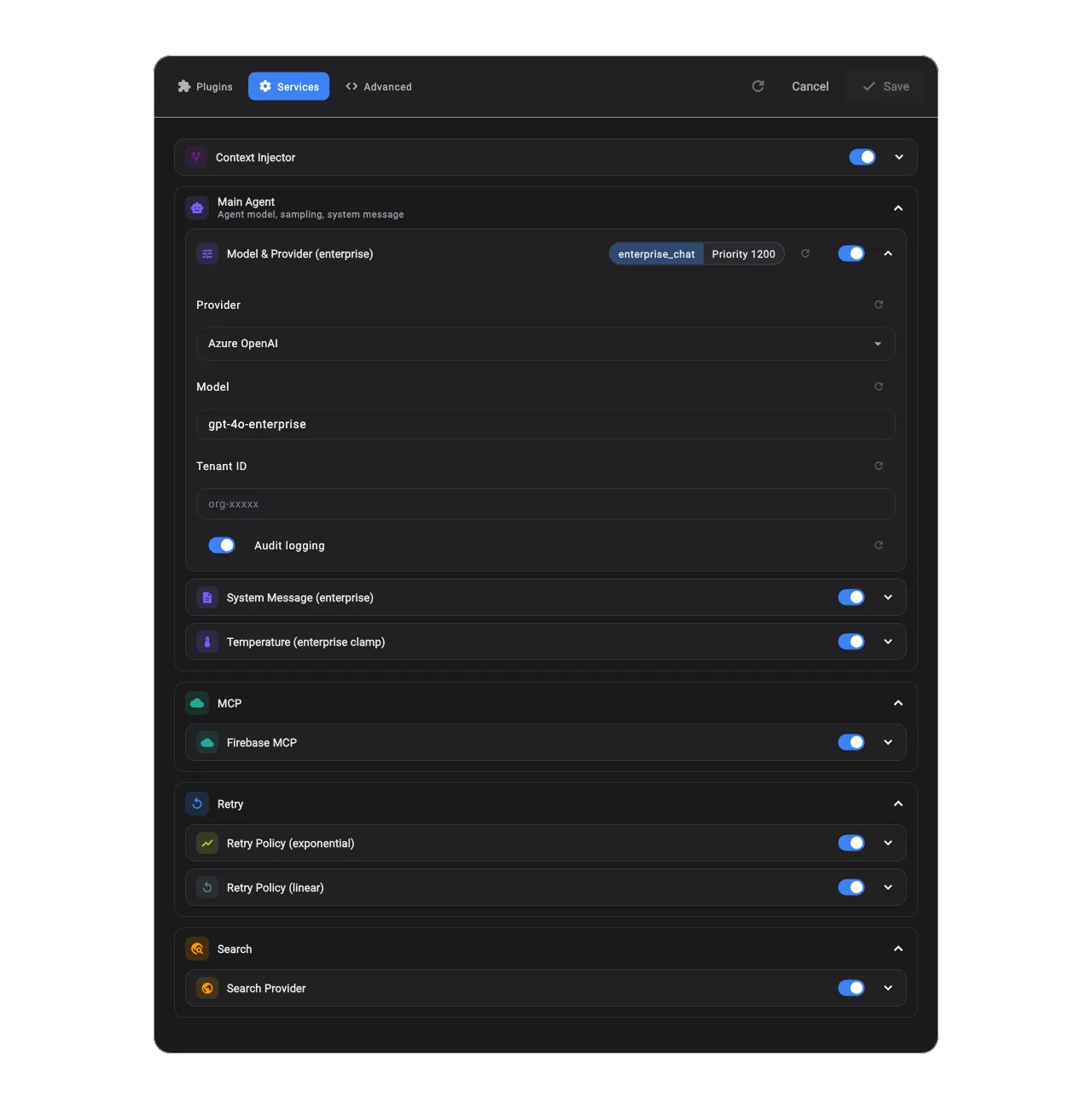 Plugin Kit Dialog showing the Services tab
Plugins are wiring; services are the meat
This is the single most important rule in Plugin Kit, and the one that makes everything else click.
A Plugin registers Services. That is its job. It declares an id, lists its dependencies, registers things into the registry, and (optionally) wires up a few events for debug taps or internal bridges. It is small.
The actual work happens in services. Plugin Kit gives you three escalating tiers, depending on what you need:
- A plain Dart class: No ceremony. Use this when the behavior does not need configuration, lifecycle, or event subscriptions.
- A class that extends
PluginService: Adds typed settings injection fromRuntimeSettings. - A class that extends
StatefulPluginService: Offers config injection, as well as a lifecycle that is bound to a context, auto-tracked event subscriptions, and a place for session-bound state (caches, streams, lists). Your “Repository”, “Clients”, “Services” that you know likely conform to this shape the most and would want to extend this.
A PluginService would be something like
“This is the system prompt for agents”.
A StatefulPluginService would be something like
“This is the Chat Thread service that holds all the messages of this session in memory” or
“This is my HTTP Client holder”.
Things that need to retain their lifespan across the session; singletons or otherwise.
Two plugins, one slot, no if statements
Let’s go back to the AI chat product and pick the smallest real escalation: a teammate wants to ship an experimental system prompt without touching the original one.
The original prompt lives inside a chat plugin. Here it is at its boring best:
abstract class SystemPrompt {
  /// Builds the prompt for [user].
  String build({required User user});
}

/// Boring default: ships with the chat plugin.
class DefaultSystemPrompt implements SystemPrompt {
  @override
  String build({required User user}) =>
      'You are a helpful assistant. The user is $user.';
}

/// The chat plugin: ships the original system prompt at default priority.
class ChatPlugin extends SessionPlugin {
  @override
  PluginId get pluginId => const PluginId('chat');

  @override
  void register(ScopedServiceRegistry registry) {
    registry.registerSingleton<SystemPrompt>(
      const ServiceId('system_prompt'),
      () => DefaultSystemPrompt(),
    );
  }
}

Future<void> main() async {
  final runtime = PluginRuntime(plugins: [ChatPlugin()])..init();
  final session = await runtime.createSession();

  final prompt = session.resolve<SystemPrompt>(
    const ServiceId('system_prompt'),
  );
  const user = User(
    name: 'Ada',
    recentActivity: 'Opened 3 PRs, reviewed 2 designs',
  );
  print(prompt.build(user: user));
  // → "You are a helpful assistant. The user is Ada. Recent activity: ..."

  await runtime.dispose();
}
One plugin, one slot, one winner. Easy.
Now the teammate has an idea. They want to A/B a new prompt that injects the user’s recent activity. They do not want to touch the main chat plugin. They do not want to add an if statement. They want their experiment to live as its own plugin, opt in for testing, and disappear cleanly when nobody wants it.
They write this:
/// Experimental variant: injects the user's recent activity.
class ActivityAwareSystemPrompt implements SystemPrompt {
  @override
  String build({required User user}) =>
      'You are a helpful assistant. The user is ${user.name}. '
      'Recent activity: ${user.recentActivity}.';
}

class ActivityAwarePlugin extends SessionPlugin {
  @override
  PluginId get pluginId => const PluginId('activity_aware');

  // Marks as disabled by default. Needs to be explicitly enabled.
  @override
  List<FeatureFlag> get featureFlags => const [FeatureFlag.experimental];

  @override
  void register(ScopedServiceRegistry registry) {
    registry.registerSingleton<SystemPrompt>(
      const ServiceId('system_prompt'), // Same service id!
      () => ActivityAwareSystemPrompt(),
      priority: Priority.elevated, // wins (beats Priority.normal default)
    );
  }
}
Two plugins, one slot. The teammate’s plugin wins because it asked for higher priority. The chat plugin still registered its original prompt; it is just sitting at the lower priority, available as a fallback.
The agent loop has not changed:
final prompt = session.resolve<SystemPrompt>(
  const ServiceId('system_prompt'),
);
print(prompt.build(user: user));
No conditional, no flag, no branch. Whatever is registered at the highest priority for that slot is what resolve returns. The call site does not know it is in an experiment.
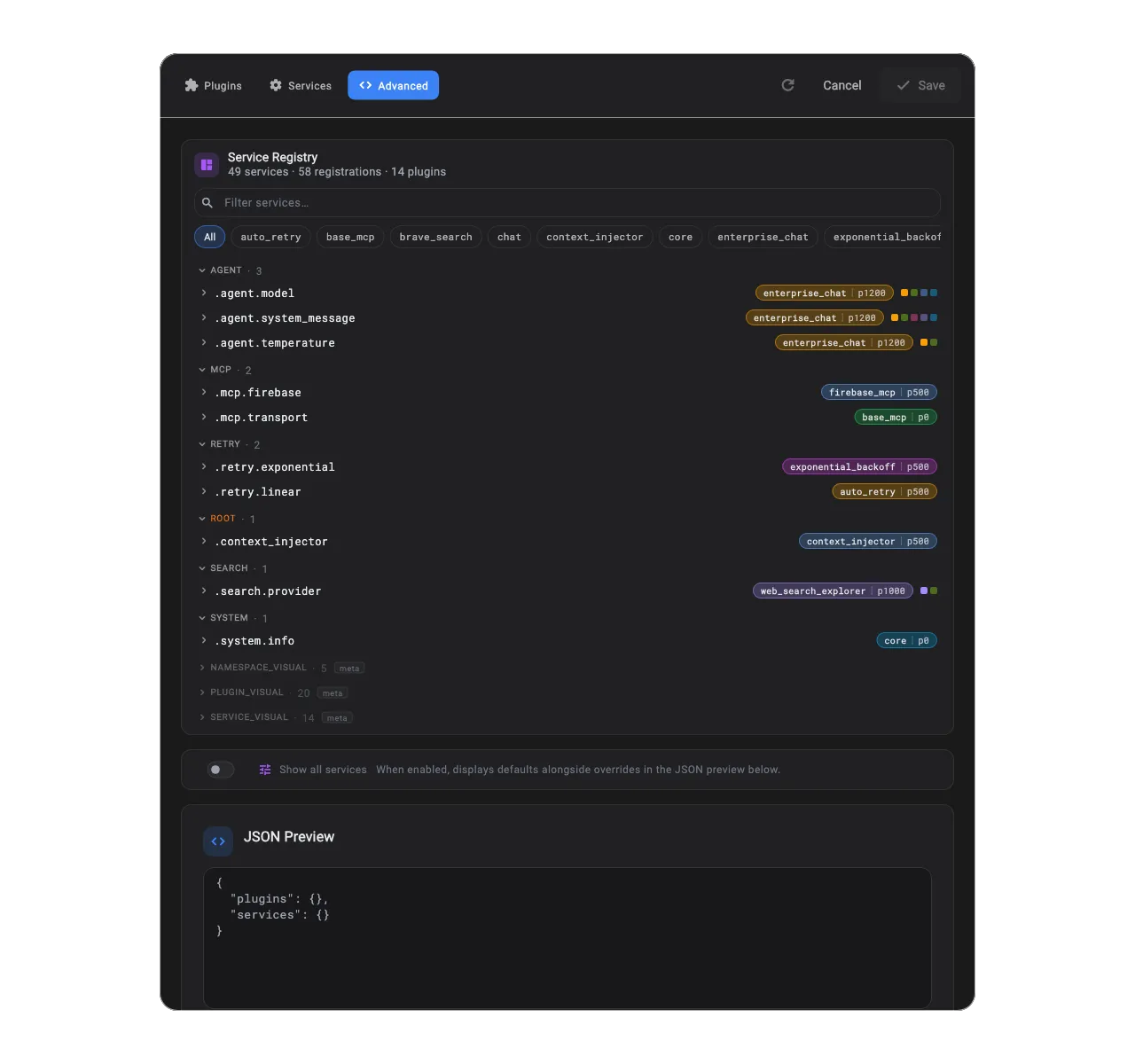 Plugin Kit Dialog showing how services competing are visualized in the Advanced tab.
Now ship to production with both plugins offered to the runtime. The user, the developer, or the QA tester pulls up the settings dialog and decides whether to test the experimental plugin or keep the original. The settings UI does not need to know what these plugins do; it flips a boolean and hands the runtime a new settings json.
// JSON-serialized, sent over the wire, etc.
final newSettings = RuntimeSettings.fromJson(jsonSettings);
await runtime.updateSettings(newSettings);
The experiment detaches. Its singleton is torn down. The chat plugin’s original prompt becomes the winner again, because nothing higher is fighting for the slot anymore. The next message the agent sends uses the original prompt. No reload. No session rebuild. No if (experimentalMode) flag scrubbed across the codebase.
Flip the boolean back to true and the experiment re-attaches. The original goes back to being the loser-in-waiting.
A few things to notice about this shape:
- The chat plugin and the experiment plugin do not know about each other. They are physically separate files.
- The chat plugin does not check for an override.
- The experiment plugin does not ask the chat plugin’s permission. They both register into a slot named
system_prompt; the registry decides who wins. - If a third teammate ships a third variant tomorrow at priority 200, they do not edit either of the existing plugins. They write a new plugin and ship it.
- The settings change is a statement of intent, not a script. You did not write code that said “when the toggle flips, restart the agent loop with the default.” You handed the runtime a new picture of the world. It figured out which plugins to detach, which to leave alone, which to re-attach, and converged on that state. That is reconciliation, and it is the thing a plugin runtime gives you that a DI container cannot.
- The original prompt was never deleted. Never special-cased. Just outvoted. When the override goes away, the runtime does not have to do anything clever; the original is already there, already registered, ready to win the next resolve call.
This is what “plugins are wiring; services are the meat” buys you in practice. The wiring is two register calls and a priority number. The meat is whatever prompt-construction logic each plugin’s service implements.
Swapping behavior at runtime is not a refactor; it is a settings update.
The uncomfortable overlap with state management
At this point, a Flutter developer is probably thinking:
Wait. This is
Yet Another State Management Solution.
Yes. A little.
Plugin Kit has a registry. It has a typed event bus. It has session-scoped services. It has lifecycle. It can notify the UI when something changes. If you squint, that sounds suspiciously close to the job Riverpod, Provider, Bloc, or a pile of ChangeNotifiers usually does.
But the overlap is not the interesting part. The boundary is.
State management is usually best at making some service exist and making the UI react to it efficiently.
Plugin Kit is about deciding which services are allowed to exist in the first place. Those are different questions.
A state manager asks:
What is the current value of THIS service, and what widget needs to rebuild?
A plugin runtime asks:
Who is asking questions and who can answer those questions?
That difference changes where the code wants to live.
If a widget needs to know whether a panel is open, keep that in Flutter state. If a text field needs a controller, keep that in the widget layer. If a screen has loading, success, and error states, Bloc or Riverpod can model that beautifully.
But if a feature can be disabled by settings, replaced by another plugin, scoped to a session, overridden for one workspace, or allowed to participate in a workflow it did not originally own, that is Plugin Kit territory.
State management owns presentation state. Plugin Kit owns participation.
- A chat screen showing messages is presentation state. A service deciding whether to enrich an outgoing prompt is participation.
- A model selector showing the current model is presentation state. The list of available models changing because provider plugins were enabled or disabled is participation.
- A loading spinner is presentation state. A fallback provider taking over because the first is unavailable is participation.
This is why Plugin Kit can sit beside Provider, Riverpod, Bloc, or GetIt instead of replacing them. You can let your existing state library keep doing widget-facing work, while Plugin Kit owns the runtime protocol underneath it.
In practice, there are three reasonable shapes.
- Bridge shape: Your Provider, Bloc, or Riverpod controller listens to Plugin Kit events and exposes widget-friendly state. The most comfortable migration path because your widgets barely change.
- Direct runtime shape: A shell widget listens to the session bus and calls
setStatedirectly. Surprisingly fine for small apps, or for plugin-heavy surfaces where the runtime is already the main source of truth. - Mixed shape: Stable screen state stays in your state library; replaceable behavior moves behind plugin events, requests, and service slots.
That is the pragmatic answer. Do not move everything into Plugin Kit. Move the seams where participation matters.
If a Cubit is just taking a Plugin Kit event and immediately re-emitting the same information as Cubit state, ask whether the extra layer is buying you anything. Maybe it is: BlocBuilder filters, existing conventions, test helpers, team familiarity. Good. Keep it.
But if the Cubit has become the place where every provider, fallback, feature flag, tenant override, and plugin-specific branch gets manually coordinated, it is no longer just managing state, it is pretending to be a runtime. That is the line.
Use your state library to make the UI pleasant. Use Plugin Kit to make the system negotiable.
With all that being said, I’ve developed a sister Flutter package that glues that gap shut into a complete flutter-available state management solution called flutter_plugin_kit . It adds the little Flutter-flavored features that allow you to talk to your runtime without state management library as glue.
A complete Flutter guide to integrate or migrate an existing state management solution is available in the documentation.
When you need a runtime
Plugin Kit is not for making simple apps look sophisticated.
It is for the moment your app stops being a fixed graph of objects and starts being a living system of features built like lego bricks. When behavior needs to enter, leave, compete, override, listen, veto, and clean up after itself, you have outgrown dependency injection.
You need a runtime.
If “we’ll just add another flag” has become the beginning of every bug in your codebase, give it a look:
Documentation & Demos
Plugin Kit: A Dart plugin runtime for apps that have grown into platformsA Dart plugin runtime for apps that have grown into platforms. Replaceable services, isolated sessions, settings that reshape the running system, and a drop-in Flutter dialog to flip plugins live.plugin-kit.saad-ardati.dev
Source Code
GitHub - SaadArdati/plugin_kit: A powerful plug'n'play plugin system for any Dart project.A powerful plug'n'play plugin system for any Dart project. - SaadArdati/plugin_kitgithub.com
A note on scope: as of 0.1.0, plugins compile into your application binary. Out-of-process loading (over IPC, websocket, or a wasm boundary) is planned but not yet implemented. If your use case needs that today, this is not it, but it is being built toward it.